
Signal locked
Super TV
v6.5.7 · 48.7 MB · Android 4.4+ · Free
Super TV is the official download site for Xuper TV, a free Android streaming app that combines live TV channels, movies, TV series and sports in one place. The Super TV APK (v6.5.7, 48.7 MB) installs on Android phones and tablets, on Android TV and Google TV, and on the Amazon Firestick, with no account and no subscription. Every file on this page is the exact build our lab installed, scanned and tested on real devices.
Xuper TV is the official successor to Magis TV, so if you arrived here after the old app went dark, you are in the right place. One install covers the whole household: the phone in your pocket, the TV on the wall and the stick behind it.
Free download · No sign-up
APK Info
| App name | Super TV (Xuper TV) |
|---|---|
| Package | com.msandroid.mobile |
| Version | 6.5.7 (mobile build) |
| Size | 48.7 MB |
| Android | 4.4 and up |
| Category | Entertainment |
| Rating | 4.3/5 across third-party APK listings |
| Price | Free |
Table of Contents
Tune to the right channel
TV Build or Mobile Build? Pick in 10 Seconds
Channel 01 · Big screen
TV build (v4.34.x)
For Android TV, Google TV, TV boxes and Firestick. Big tiles, full remote navigation, made for the couch.
Channel 02 · In your hand · Hosted here
Mobile build (v6.5.7)
For phones and tablets. Touch interface, 48.7 MB, the exact file on our download page.
The two builds are separate apps, not upgrades of each other. Installing the phone build on a TV works but steers badly with a remote.
Broadcasting now
What the App Puts on Your Screen
Live TV channels
Hundreds of live feeds across sports, news, movies, kids and international categories, with a program guide.
Movies and series on demand
On-demand films and full seasons with episode lists, multiple servers per title and subtitles.
Sports without the hunt
Live matches and sports channels in one category, with the EPG showing kickoff times.
4K adaptive streaming
Quality steps from SD to 4K with adaptive switching when your connection wobbles.
Offline downloads
Save movies and episodes on Wi-Fi and watch with no connection at all.
Parental PIN
Lock sections behind a PIN so the kids stay in the kids corner.
Tuning guide
Install on an Android Phone
Pull the file from the tower
Open our download page, wait for the countdown, tap download. Confirm the file is 48.7 MB.
Open the frequency to your browser
Tap the APK, allow your browser to install unknown apps when Android asks, then go back.
Lock the signal in
Tap Install, wait under a minute, then Open. No account, no activation, straight to the content.
Install on Android TV and Google TV
Add the Downloader set-top box
Install the free Downloader app from the Play Store on your TV and grant it storage access.
Dial in our download page
Type the download page address into Downloader, wait for the countdown, and fetch the 48.7 MB file.
Clear it for broadcast
Allow Downloader to install unknown apps in Settings, then Install and Open with your remote.
Install on Firestick
Get Downloader on the stick
Search Downloader in the Amazon Appstore and install it, free, no computer needed.
Unscramble installs for Downloader
In Settings, My Fire TV, Developer Options, turn on Install unknown apps for Downloader.
Tune, download, open
Enter our download page address in Downloader, run the countdown, install, then delete the APK to save stick storage.
Watch Super TV on a PC
There is no native Windows or Mac app, so run the APK in a free Android emulator like BlueStacks or LDPlayer: install the emulator, drag the downloaded APK onto its window, and stream on the big monitor.
On the air
Inside the App: Real Screenshots
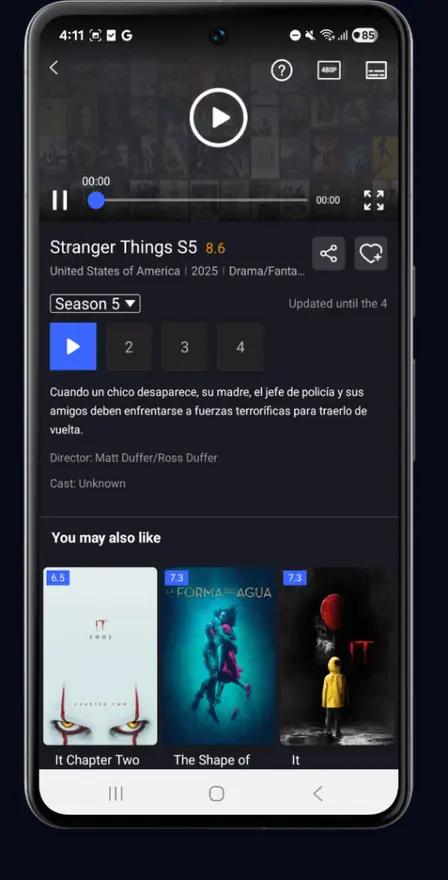
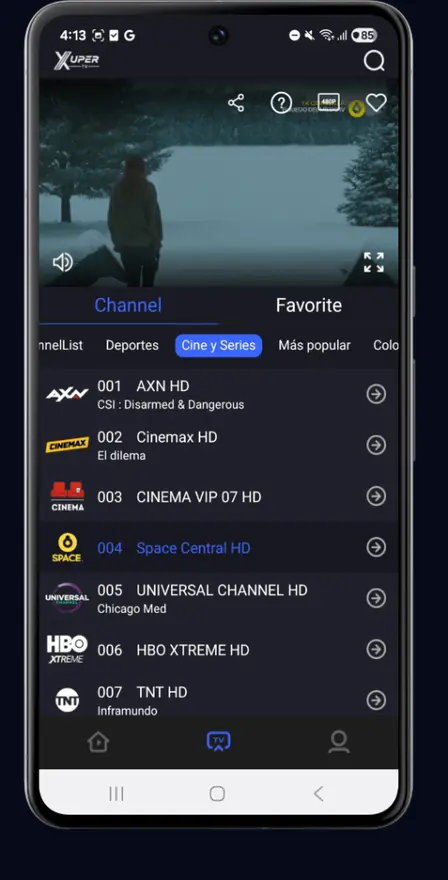
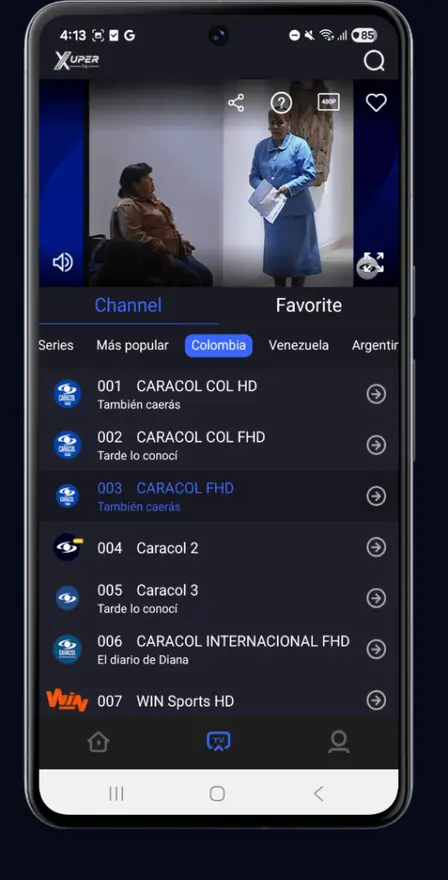
Clear signal check
Is It Safe? The Honest Answer
The exact build hosted here passed our lab verification: malware scanned, signature verified, and run for days on real phones and TVs with no suspicious behavior. We pulled the permission list straight from the APK and published it in our safety review.
Sideloading always carries some risk because it skips Play Store screening, and the app name "Xuper TV" covers many different files online. Protect yourself with two checks: the file must be 48.7 MB, and the package must read com.msandroid.mobile. Anything else claiming the name is not this file.
Read the full breakdown, permission by permission, in our Xuper TV safety review, and see how we test every app before it reaches the download button.
Static on the line
When the Picture Breaks Up
| Interference | Likely cause | Retune it |
|---|---|---|
| Endless buffering | Weak Wi-Fi or overloaded server | 5 GHz Wi-Fi, switch server, drop one quality step |
| "App not installed" | Truncated download or signature conflict | Re-download (48.7 MB), uninstall the old build first |
| Black screen on open | Corrupted cache or bad update | Clear cache, then clean reinstall |
| Channel will not load | Rotated or dead source | Try another server for that title |
| No EPG data | Source did not supply a guide | Switch server or wait for the guide refresh |
Viewer mail
FAQs
What is Super TV APK?
Super TV APK is the install file for Xuper TV, a free Android streaming app with live TV channels, movies, TV series and sports. This site is the official download page for the verified v6.5.7 build (48.7 MB), tested on real devices by our analyst.
Is Super TV APK free?
Yes. The app is free to download and free to use, with no account and no subscription step. The site is supported by a single clearly labeled advertisement.
Is Super TV APK safe to install?
The build hosted here passed our lab checks: malware scanned, signature verified, and run for days on real phones with no suspicious behavior. Always verify the file size (48.7 MB) and package name (com.msandroid.mobile) before installing any APK from anywhere.
Which version do I need: the TV build or the mobile build?
Phones and tablets use the mobile build v6.5.7, the file on our download page. Android TV, Google TV and TV boxes use the separate TV build (v4.34.x) with a remote-friendly interface. They are not upgrades of each other, so match the build to your screen.
How do I install Super TV on Firestick?
Install the free Downloader app from the Amazon Appstore, allow it to install unknown apps in Settings, then open our download page in Downloader, wait for the countdown, and install the APK. The full walkthrough is in our Firestick guide.
How do I install Super TV on Android TV?
Sideload the APK with the Downloader app, a USB drive, or Send Files to TV. Allow installs from the source you use, then open the app with your remote. Our Android TV guide covers all three methods.
What is the Downloader code for Super TV?
Downloader codes are short numeric shortcuts to a download page, but they expire as pages move. The reliable route is typing our download page address into Downloader directly. Our codes guide explains both.
Why does the install fail with an App not installed error?
The usual causes are a truncated download (verify 48.7 MB), a signature conflict with an older install, too little storage, or Android below 4.4. Our install error guide fixes each one.
What internet speed does Super TV need?
About 3 Mbps sustained for SD, 5 Mbps for HD, 10 Mbps for Full HD and 25 Mbps for 4K. If streams buffer, drop one quality step or switch servers before changing anything else.
Is there an iPhone or iOS version of Super TV?
No. Xuper TV is Android-only and there is no iOS build. Any site offering a so-called iOS version is not offering the real app. iPhone owners can still watch via the TV app itself.